Project-Specific MCP Servers


For the uninitiated, “agents” is the name given to LLM-powered workflows, allowing LLMs (large language models, like GPT-4 or Claude Sonnet) to do things other than spit out deceptively-cutesy text. Common tools include editing files, searching the web, and more.
If you’re like me, and you’re on that 10x developer grind (10x effort, 1x results), you’ve likely been using “agents” in your projects. If so, it should be no surprise that over the past year, I’ve hit several snags, nay, footguns, in my attempts to allow OpenAI’s agenda to slowly take over my codebase.
As time has gone on, I’ve found myself more and more curious about the capabilities of MCP (Model Context Protocol) servers, and how their usage might solve my hyper-specific-probably-could’ve-solved-this-myself problems with agents. Today I’m going to talk about one instance of my experiments.
The Problem
Previously on this site, I’ve mentioned my up-and-coming hit site, Steam Vault. As of writing, it has localizations for about 15 languages. This localization is currently handled by a framework-agnostic JS library called Paraglide (though this might change in the future, with the advent of async SSR in SvelteKit). Messages are split into individual JSON files, each with ~250 strings each. Of course, I’m using agents to help me “manage” these translations, as well.
If you’re like me, you might have already spotted the issue; when asking an LLM to add/remove/do practically anything with any of these files, it will almost always attempt to read every… single… file. With all of these new-fangled models out lately, I figured this wouldn’t be an issue. However, my plans were foiled, because after a mere one or two requests, I was getting the dreaded “summarizing conversation history”, and a noticably lighter wallet… This makes a simple request like “add a new translation for ‘Hello World’ in all languages” into an increasingly Herculean task.
Alternatively, you might be sane, and say “surely you could just split your JSON files into smaller chunks?” And you’d be correct!
The “Solution”
Enter MCP servers. Agents being built upon MCP servers, it only makes sense that I, the great & humble Cole, should build my own MCP server! The idea is simple:
- Figure out how/when/why the LLMs attempt to access these files.
- Spec out a minimal set of “tools” that covers all of these patterns.
- Spend an inordinate amount of time coding a server.
- Bang your head against the wall a little.
- ???
- Profit!
Great, let’s get started!
I ain’t the Sharpest Tool in the Shed
For my experiment, I chose these tools:
- Search/list keys/translations
- Get translations(s) by key
- Set translation(s) by key
- Delete translation(s) by key
- List available languages
- List missing keys across languages
It’s worth noting that this is probably too many tools. Some of these (like the first two, or get/set/delete) could’ve been merged into one. This is a case where less is more.
Building the Server
You know what, I’m actually not going to explain this part. Here’s the code.
TL;DR: it’s a simple NodeJS script using @modelcontextprotocol/sdk. MCP standards accept a variety of sources, including HTTP & standard input/output (this being the latter). The whole file is ~500 lines (yikes).
Using the Server
Using the server is… a bit tricky, depending on where you are trying to call it from. There are hundreds of agent frameworks (most of them are VSCode forks), and each has its own configuration. For my use case (VSCode, boo hoo), I created a .vscode/mcp.json file as follows:
{
    "servers": {
        "tool-name-in-yoloCase": {
            "type": "stdio",
            "command": "node",
            "args": ["${workspaceFolder}/path/to/script.js", "--includeAnyArgumentsHere"],
        }
    }
}
Lastly, no good MCP implementation is complete without an AGENTS.md (or similar) file begging your LLM to use this instead of reading the files by hand!
Included is a
i18n-jsonMCP tool. It provides direct access to the localization files. Do not read anything insidepackages/site/src/lib/paraglideUNDER ANY CIRCUMSTANCES, or I will never see my family again (in the Sims)!
The Results…?
Drumroll, please…
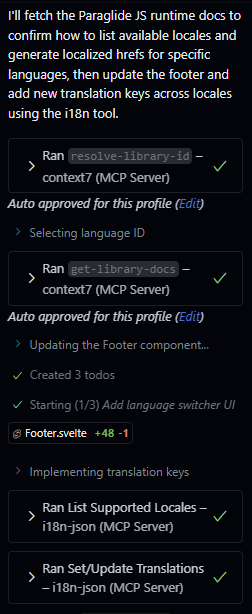
Awesome! With enough coaxing, I was able to get Copilot to update all 15 languages with 2 simple tool calls. Great, now I just need to add support for Cursor, Claude Code, CLIne, Windsurf, Codex, Kilo Code… Yeah, nevermind.
Final Thoughts
I’m in love with the theory behind this. I know there are infinite projects & monorepos with countless stray script files, brimming with instructions attempting (in vain) to get LLMs to use them properly. How much less headache-inducing would it be if you could just wrap it up with a pretty little tool? This is an automation nerd’s wet dream.
While this project is a small win for me, I can’t help but feel disparaged by the current state of MCP. I’m going to complain for a little bit about the current state of MCP tooling.
modelcontextprotocol/sdk
Forewarning: I haven’t tried the Python, but I know Python has its own set of validation packages, so I imagine the story is similar.
The current MCP SDK for NodeJS has a hard requirement of zod@3. If you are using zod@4, you have access to the zod/v3 compatibility layer, but this froze my IDE’s TypeScript server. Additionally, all parameters don’t require a ZodType, but instead a ZodShape, which is an object that contains ZodTypes… So, you can’t intuitively extract your MCP functions from the calls to registerTool using z.Infer.
In JavaScript land, we have the “relatively new™” Standard Schema validation specification. This would be a far better fit for the SDK. A quick surf in the “issues” tab reveals that others have suggested this as well. Shout out to @jake-danton for creating a fork!
I Love Dot-Files So Much
While most agent frameworks sport an MCP configuration inspired by Claude Code’s setup, there isn’t so much as a single JSON schema available from anyone. Assuming your workspace’s configuration is correct, each framework is looking in a different place for the accursed file!!! For repositories with multiple contributors (couldn’t be me, thank God), this obviously sucks. Even completely arbitrary standards, like AGENTS.md are being slowly adopted across frameworks.
Ease of Development
While my ~500 line KV store isn’t exactly a sight to behold, I would kill to have a tool that simplifies building workspace-scoped MCP tools. While I’m not sure what that would look like (cross-platform compatibility be damned), I think it would be a game changer for my new software development lifecycle. I’m calling it “AI Driven Development”—or ADD (not to be confused with the neurological disorder!).
In All Seriousness
I’m quite happy with this. Again, it would probably would have been a better idea to split my JSON files into “namespaces”, but to be honest… I don’t know how I feel about having 50+ localization sources to manage. Would I do this again? Probably.